COPY / CLAIM IN GAME / KEEP TRACK
Pull a Dino Codes
Last updated: · How we check
Developer-listed entries: 1. Other public records stay separate, with no invented expiry dates or release dates.
Tap any code to copy it. The first table holds what the developer currently lists. The second holds reports from other trackers that may already be dead.
Working codes the developer lists
1 listed · not tested in gameThese appear in the official game description today. A listed code can still be rejected on your account or server.
| Code | Reward & entry point | Added | Source | Your checklist |
|---|---|---|---|---|
MEGAEVENT | 70× luckShop → Codes | Not disclosed | Developer on Roblox ↗ |
Community reports — some may be dead
9 reports · not tested hereOther trackers list these. Try them and see what your game says. A tracker badge does not prove a code still works.
| Code | Reward & entry point | Added | Source | Your checklist |
|---|---|---|---|---|
SUPERTHROW | Next throw Legendary or betterShop → Codes | Not disclosed | Roblox Den · third party ↗ | |
SEKRETDINO | Secret SpearLobby Skeleton | Not disclosed | Roblox Den · third party ↗ | |
SOBOTAUPDATE | One spearLobby Egg | Not disclosed | Roblox Den · third party ↗ | |
NEWUPDATE | 50× luck on the next throwShop → Codes | Not disclosed | Roblox Den · third party ↗ | |
Pulladino | 100× luck on the next throwShop → Codes | Not disclosed | Roblox Den · third party ↗ | |
Haniadagahubert | 100× luck on the next throwShop → Codes | Not disclosed | Roblox Den · third party ↗ | |
RELEASE | 100× luck on the next throwShop → Codes | Not disclosed | Roblox Den · third party ↗ | |
Thebestgame | 50× luck on the next throwShop → Codes | Not disclosed | Roblox Den · third party ↗ | |
VOLCANO | 100× luck on the next throw + 144,000 CashShop → Codes | Not disclosed | Roblox Den · third party ↗ |
Expired code archive
No entry has a verified expiry date and reason in this dataset. Unverified records above are not silently relabeled expired.
What “working” means on this page
The first table contains codes currently printed by the developer, or entries supported by a recorded in-game test. No code in this version has been redeemed by this site's editor. A developer listing is useful evidence, but it is not a promise that every account, server or later game version will accept a code.
The next table preserves other public records under community-listed / unverified. A record does not become expired merely because it disappeared from the latest description. It moves to the expired section only when there is a dated reason to support that change. No expiry dates have been invented for this first dataset.
Which reward should I expect?
The current official listing describes MEGAEVENT as 70× luck. It does not disclose a full probability model in the sources checked here. We therefore do not turn that label into a percentage chance of a Secret dinosaur, a guaranteed rarity or a stacking calculation. Read the luck guide for the paid bonuses that can actually be traced to the Roblox catalog.
The Added column records a code's release date only when a source establishes it. Where no release date is given, the table says Not disclosed. The JSON's first-seen date is an internal record of when this website collected the entry, and is deliberately not presented as a developer release date.
Keep the correct panel in view
Normal code entries use the Shop interface in the reference captures. Skeleton and other secret codes have different entry points. A string associated with the Egg should not be treated as a standard luck code, and a Skeleton-themed reward does not establish the existence of a Fossil currency code.
The four illustrated steps below use credited source captures. They show the relevant controls, but are not four screenshots taken during a current phone session. Mobile layout, button placement and panel availability can change. Follow the labels in your own game rather than a pixel position in an older capture.
Check a failure without guessing
Try these five checks, then record the exact in-game response:
- Text: copy the spelling and capitalization as displayed; remove spaces before and after it.
- Panel: standard codes, Skeleton entries and Secret Egg entries can use different boxes.
- Previous claim: check whether you already used the entry on this Roblox account. Your local tick is only a reminder.
- Server state: if a panel does not respond, reopen it or rejoin through the official game page. This is a troubleshooting attempt, not a guaranteed fix.
- Availability: compare the current developer announcement. We have not verified region restrictions, and will not invent a country lock as the explanation for an error.
A rejected code is evidence about that attempt. It is not enough by itself to diagnose the reason, and this website cannot issue a missing reward or reset a Roblox claim.
Your redeemed checklist stays on this device
Tick a code after the game reports a successful claim. The mark is saved in localStorage for this website and browser. It is not shared with Roblox, linked to a Roblox account or synchronized across phones. Clearing browser data removes the marks. If browser storage is unavailable, the checklist still works for the current visit and displays that it cannot retain the marks.
Use Clear redeemed marks if you switch accounts. The site never requests a Roblox password. Every code remains visible whether or not you have marked it, so the checklist cannot silently hide a newly reviewed record from you.
Where the records come from
The official Roblox experience is the primary announcement source. Roblox Den supplies separately labeled community records and the interface references. The linked Reddit discovery thread points to another code site; it is a lead, not an independent developer confirmation.
How to redeem standard Pull a Dino codes
Open Shop
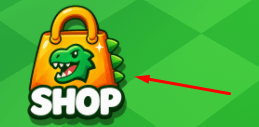
Launch the official Pull a Dino experience. The source capture shows a Shop control on the left; open it when your game has loaded.
Choose Codes
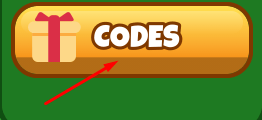
In the Shop interface, choose Codes. This is the standard-code route shown in the reference, rather than the separate Skeleton or Egg panel.
Enter a standard code
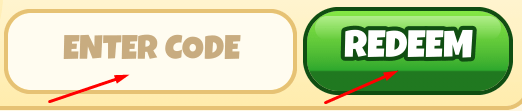
Copy a code from the table and paste it into Enter Code. Remove spaces at either end and preserve the displayed capitalization.
Select Redeem and check the response
Press Redeem in that panel. Read the in-game response before marking your local checklist; copying on this website alone does not claim a reward.
Interface references: Roblox Den. Phone layout may differ; these are reference captures, not our current mobile redemption test.
Pull a Dino FAQ
What are the latest Pull a Dino codes?
Current evidence-backed code records: MEGAEVENT. See each row for its source and reward. A current developer listing and a successful in-game test are different kinds of evidence; this version contains no successful redemption test.
Where do I enter Pull a Dino codes?
The reference screenshots from Roblox Den show Shop, then Codes, then an Enter Code field and a Redeem button for standard codes. Skeleton and Secret Egg entries use separate lobby interactions. The interface may differ on your device or after an update.
Why is my Pull a Dino code not working?
Check spelling, surrounding spaces and the correct redemption panel. A code may already have been claimed or may no longer be accepted. Record the exact in-game message before concluding why it failed.
Is NEWUPDATE still working?
NEWUPDATE remains on community lists, but it is not the code shown in the developer's current description. We have not tested it, so this site labels it unverified rather than working or expired.
Are there free Fossil codes?
No Fossil code has been verified from the current official description or pass catalog. We do not rename a Skeleton code as a Fossil currency reward. See the Fossil code page for that distinction.
Do secret codes use the same box as normal codes?
Community screenshots show separate Enter Secret Code panels at the Skeleton and Egg. SEKRETDINO is associated with the Skeleton and SOBOTAUPDATE with the Egg. Their current acceptance is not independently verified here.
Does marking a code as redeemed claim its reward?
No. The checkbox is your own checklist stored in this browser. It does not connect to Roblox, redeem a code or verify that a reward was granted. Clear the mark whenever you want to track another account.
When were these codes added?
The exact release dates have not been disclosed in the sources we checked. The Added column says Not disclosed rather than inventing a date. The JSON keeps a separate first-seen date for this site's own record.